
HomeGuidesAccounts & Platforms
How to Recover a Restricted LinkedIn Account: The Appeal Form I Used
How I appealed a restricted LinkedIn account through LinkedIn's official form, verified my identity and got a reply, with the appeal message I used.
 Mohammad Shojib AhmedUpdated · 5 min read · 59K views
 2:57 video
Key takeaway
Use only LinkedIn's official appeal form, answer every question truthfully, share your ID only on LinkedIn's own domain, and submit one complete appeal.
My LinkedIn account was restricted, and I could not use it normally. I eventually recovered access by contacting LinkedIn through its official account-verification appeal form—not by paying a recovery service or installing a third-party tool.
In my video I show the form I used, the questions I answered, the message I submitted, and the confirmation I received afterward. This article turns that walkthrough into a written guide, including a copyable appeal-message template. My appeal was successful, but that does not guarantee the same result or timeline for every account.
Note: this is the appeal route that worked for me. LinkedIn changes its forms from time to time, so follow the official instructions shown for your own restriction.
Before you begin
Have the email address connected to your LinkedIn profile, your profile URL if available, the approximate date of restriction, and a suitable government-issued photo ID ready. Use the same legal name and contact information associated with your account wherever applicable.
If LinkedIn already shows you an identity-verification or appeal option when you attempt to sign in, follow that official on-screen process first. The form in the video is another official route that was accessible without signing in when I recorded the tutorial; LinkedIn may change its form or require a different verification flow.
Step 1: Open LinkedIn's official appeal form
Open the LinkedIn account appeal form. The page demonstrated in the video was headed Contact LinkedIn support and Account Verification Questions.
Use only a page on LinkedIn's genuine domain. Avoid third parties claiming they can remove account restrictions in exchange for money, your password, or copies of your identification documents.
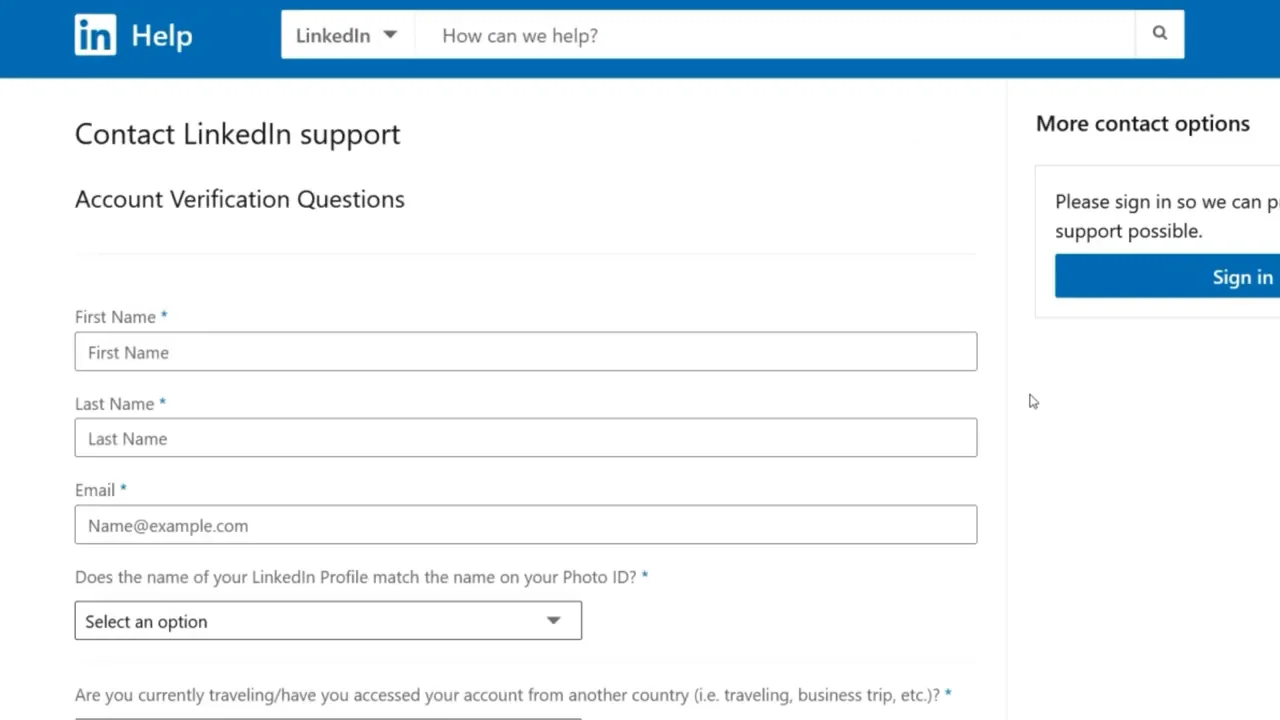
From my video at 0:12: LinkedIn’s Contact LinkedIn support form, Account Verification Questions.
Enter your first name, last name, and the email address associated with your restricted account. A different email could make it harder for support to connect your request to the correct profile.
Step 2: Answer the account-verification questions
The form shown in my video asked several questions about the profile and recent account access. Answer each one based on what actually happened to you, not by copying my answers automatically.
- Does your LinkedIn profile name match your photo ID? Select the accurate response. I selected Yes because my names matched.
- Are you traveling or accessing your account from another country? I selected No because I was not traveling. If you are traveling, say so.
- Have you used a VPN or proxy to create or access the account? Answer truthfully. I selected No for my situation.
- What is your current country or location? Enter your actual current location; do not copy the example shown in the video.
- Have you made recent changes to your profile? Answer according to your own account history.
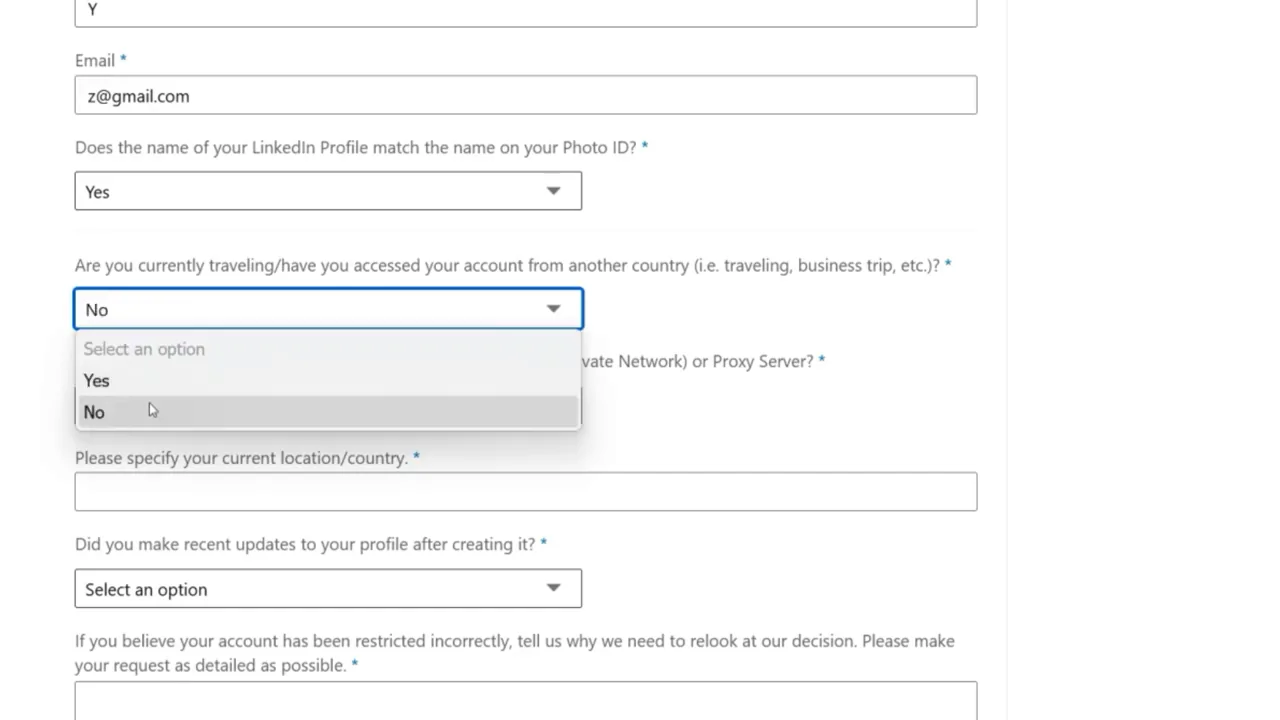
From my video at 0:41: Answering the verification questions from the drop-down lists.
The answers help support understand whether your account activity, identity, and access history match your explanation. If the form you see looks different, use the labels on the current LinkedIn page rather than trying to reproduce an older screen exactly.
Step 3: Write a clear appeal message
This is the most useful part for many viewers coming from YouTube. The form provides a text field where you can explain why you believe the restriction should be reviewed. Include enough detail to identify the account and understand your situation, but avoid unnecessary background or emotional arguments.
Here is the message I sent, as a template. Copy it and replace every part in square brackets with your own details. Remove or rewrite any sentence that is not true for you: for example, never say you did not use a VPN or automation if you did.
Appeal message template
I believe my LinkedIn account was restricted by mistake, and I kindly request a review.

My name is [Your full name] ([your LinkedIn profile URL]), and my registered email is [your email address]. The restriction occurred around [date]. I am located in [city, country] and access LinkedIn only from my personal devices.

I use LinkedIn genuinely for professional networking, job searching, and sharing industry insights. I have never used bots, automation tools, VPNs, proxy servers, or any method that violates LinkedIn policies. All my connections and messages are manual and sent to real professional contacts.

If any recent activity appeared unusual, such as increased connection requests during an active job search, it was unintentional and done at a normal human pace. I sincerely apologize if this triggered any automated review. I have already reduced my activity significantly and will fully comply with LinkedIn policies going forward.

This restriction is seriously affecting my professional networking and career opportunities. I respectfully request that my account be reviewed and reinstated. I am happy to provide government-issued ID or any additional information if needed.

Thank you for your time and consideration.

[Your full name]
Tip: After pasting, replace every [bracketed] placeholder before you submit.
Step 4: Attach your ID and submit
In the version of the form shown in the video, I uploaded photographs of the front and back of my national ID card. LinkedIn may instead offer a different verification flow or request different documentation depending on the account and region.
If the official form requests identification, upload legible images that meet the displayed requirements. Check that you are on LinkedIn's official domain before uploading sensitive documents. Do not email identification to unknown addresses or post it in public comments.
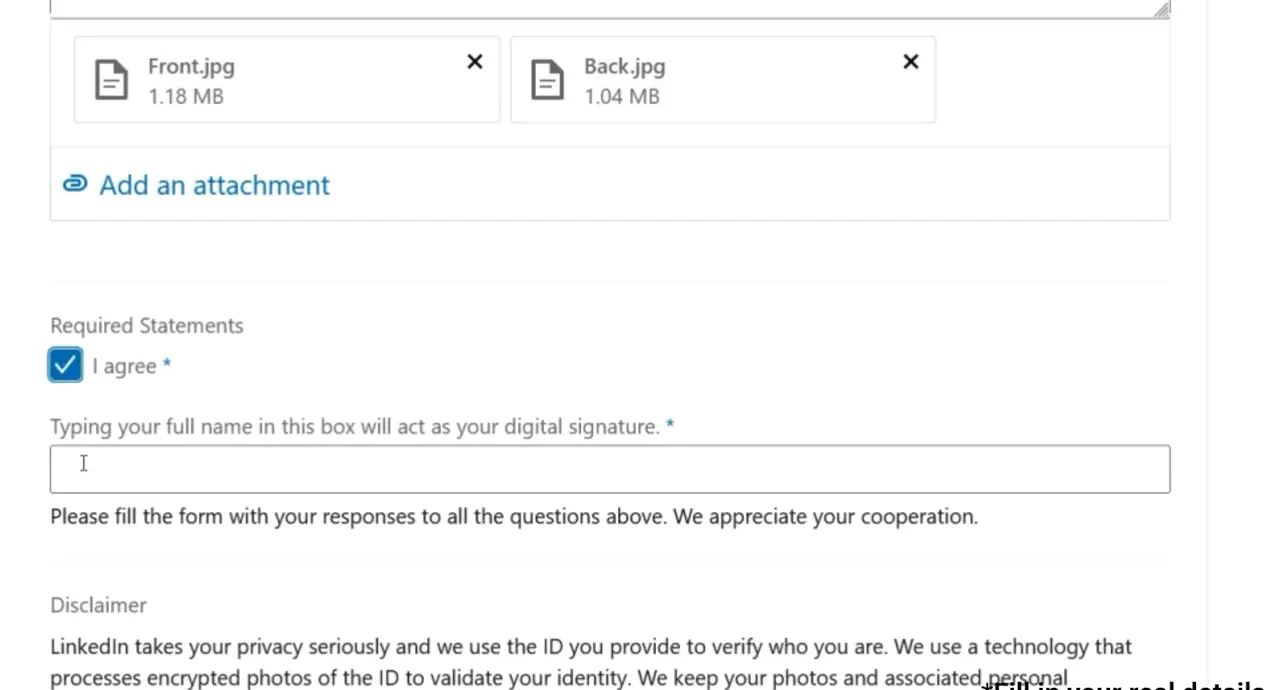
From my video at 2:22: Front and back ID photos attached and “I agree” ticked.
In the video, I mentioned the type of ID I had attached, agreed to the required statement, entered my full name as a digital signature, and submitted the form. Review everything before sending it. Do not submit duplicate requests simply because you have not received an immediate reply.
Step 5: Check LinkedIn's reply
After I submitted my appeal, I later received a response confirming that LinkedIn had verified my information and removed the restriction from my account. That is the result shown in the video. The three-minute video demonstrates the request; it is not a promise of three-minute account recovery.
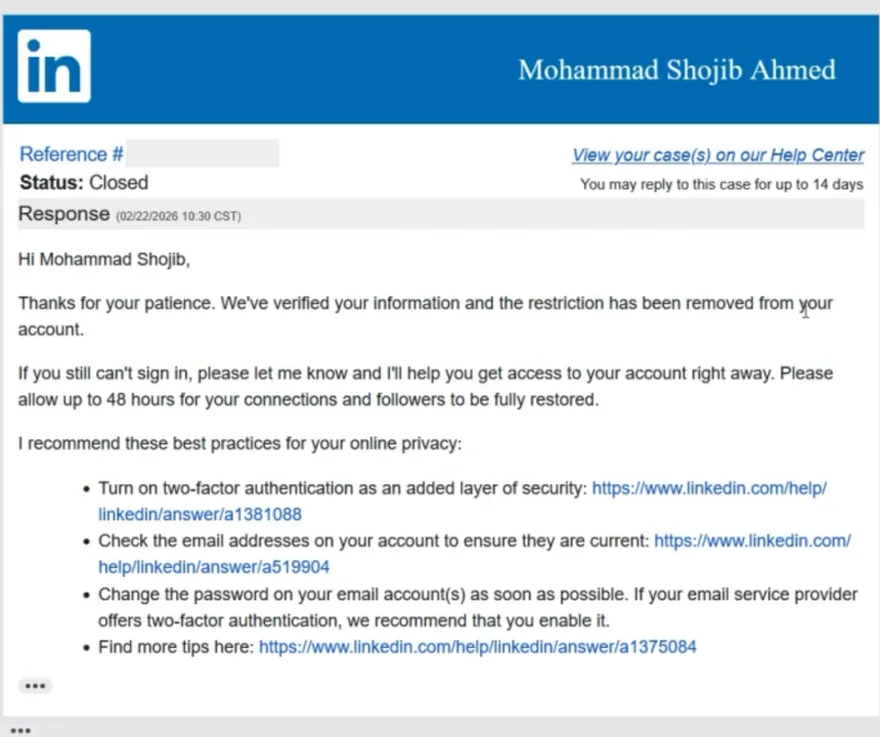
From my video at 2:36: LinkedIn’s reply: the restriction had been removed from the account.
Watch the inbox associated with your account, including spam and junk folders. If LinkedIn requests more information, respond through the official support case. Processing times and outcomes vary; a submitted appeal does not guarantee restoration.
What if the form is different or the appeal does not work?
LinkedIn can change the support interface. If the direct appeal link does not open, start from the LinkedIn Help Center and look for the account restriction and identity-verification options. Its account restrictions guidance explains that the next step depends on the reason for the restriction.
If support asks you to complete verification, follow its instructions rather than submitting multiple different forms. Keep copies of case numbers and emails for your records. Do not share your password, one-time sign-in codes, or ID photos with accounts claiming to be independent recovery agents.
Official guidance: LinkedIn: Account restrictions · LinkedIn: Identity verification
Common questions
Why was my LinkedIn account restricted?
LinkedIn restricts accounts for unusual sign-in activity, suspected fake details or breaking its User Agreement. The notice on your account usually tells you what to do next.
How long does a LinkedIn appeal take?
There is no fixed time. Some viewers in my video’s comments heard back the next day; others waited longer. Watch your email, including spam. See Step 5.
Can I just make a new LinkedIn account instead?
LinkedIn allows one account per person, so a new account can be restricted too. Appealing the original is the better route.
A final note
This is the official appeal process I personally used, not a hack or guaranteed bypass. Tell the truth in every field, share identification only through LinkedIn's legitimate verification process, and be patient while the case is reviewed. If your account is restored, review your sign-in security, account email addresses, and two-step verification settings.
Watch the original video: Recover a Restricted LinkedIn Account — my walkthrough.
Tools & files from this guide
Keep going